
Indoor humidity meters show what the air inside your home is actually doing. They are also called hygrometers. For normal home use, the job is simple: give you a useful relative-humidity reading before you decide whether the house needs more moisture, less moisture, or no equipment at all.
The best meter depends on how you plan to use it. One simple display is enough for a bedroom or office. A three-pack is better for comparing floors and rooms. A WiFi monitor earns its extra cost when you need history, alerts, or remote checks.
Before buying equipment to add or remove moisture, use How to Measure Humidity in Your Home to confirm the pattern.
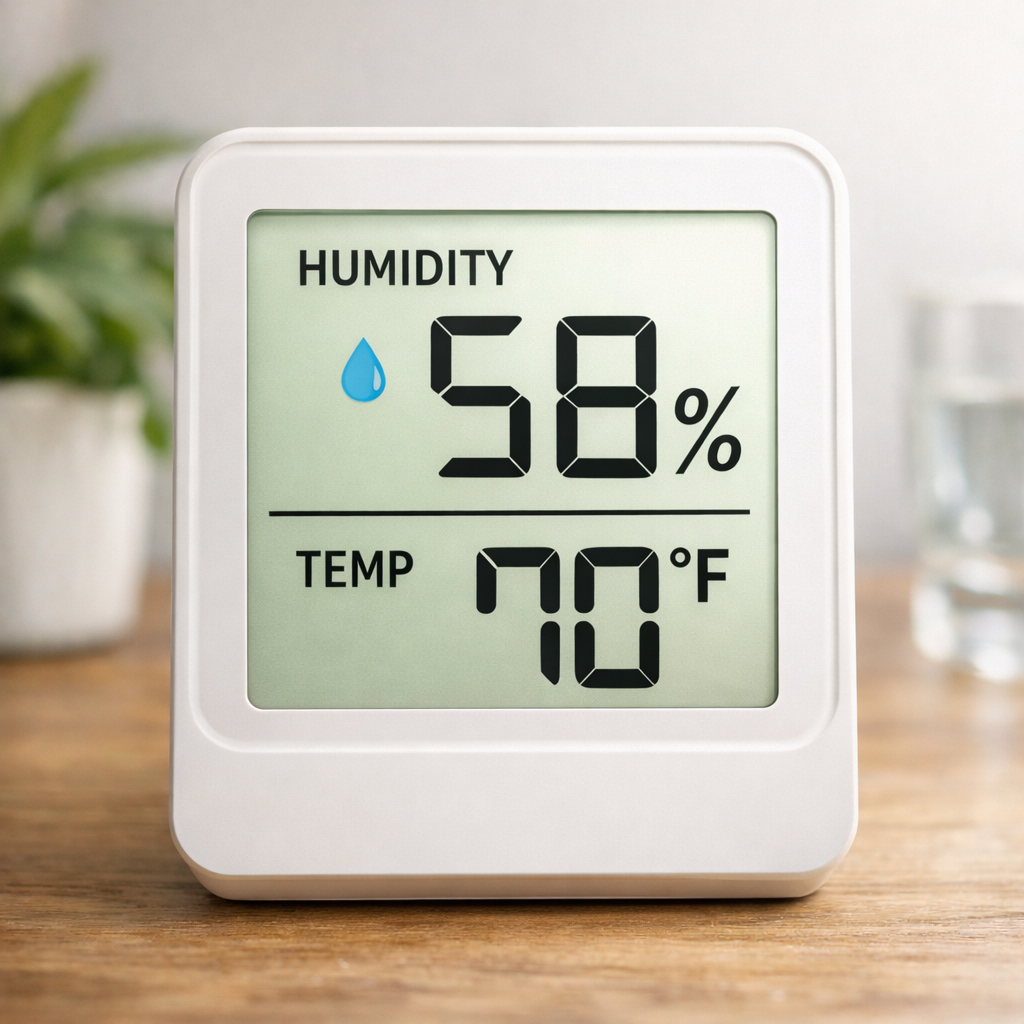
Quick Answer: Which Indoor Humidity Meter Should You Buy?
| Your situation | Our current pick |
|---|---|
| One bedroom, office, apartment, or problem room | TempPro TP50 |
| Several rooms or more than one floor | TempPro TP49 3-Pack |
| Basement, vacation home, storage area, or remote monitoring | Govee H5179 |
Our default choice for most houses is the TP49 3-Pack. Humidity problems are often different by floor or room, and three inexpensive meters usually tell you more than one premium display sitting in a hallway.
Disclosure: This guide includes affiliate links to products that fit the measuring guidance below. If you buy through those links, HumidityAtHome may earn a small commission at no extra cost to you.
As an Amazon Associate I earn from qualifying purchases.
Our Current Indoor Humidity Meter Picks
These meter selections rely on documented product features, published specifications, and available external information; they are not presented as the results of HaH laboratory or side-by-side product testing. Placement, sensor drift, and update frequency can influence readings. Compare trends over time before treating a small numerical difference as proof that one meter is wrong. Technical references: EPA monitor placement.
These are editorial picks based on use-case fit and published specifications, not claims that one consumer sensor is a laboratory reference instrument. HumidityAtHome is also comparing multiple consumer meters side by side and will add measured results when that work is complete.
Best Simple Meter: TempPro TP50
Best for: One bedroom, office, apartment, nursery, basement check, or anyone who wants a straightforward display without an app.
The TP50 is the simple pick because it does the basic job without turning humidity monitoring into a project. It shows temperature and RH on a large LCD, tracks high and low readings, and can be calibrated if you later want to correct a consistent offset.
- Published humidity tolerance of ±2% RH from 30% to 80%, and ±3% outside that range
- High/low records help catch changes between checks
- No hub, account, WiFi, or phone required
- Good fit when you only need one location
Skip it when: You need simultaneous readings in several rooms or want remote alerts and historical charts.
Best Multi-Room Value: TempPro TP49 3-Pack
Best for: Comparing upstairs and downstairs, bedrooms, basement versus living space, or several known problem areas at the same time.
This is our default choice for most houses because humidity is rarely uniform everywhere. Three meters let you see whether the problem is whole-house or local without moving one sensor around and waiting for it to stabilize after every move.
- Three independent temperature and RH displays
- Published humidity tolerance of ±2% RH from 30% to 80%, and ±3% outside that range
- Compact enough to leave in several rooms
- Fast 10-second refresh rate
- Particularly useful for room-to-room comparison
Before spreading them around: Put all three together in one stable room for several hours. Small differences are normal. A meter that consistently sits far outside the group deserves another check before you rely on it.
Best WiFi Monitor: Govee H5179
Best for: Basements, vacation homes, storage rooms, garages, workshops, or any location where you need to know what happened while you were away.
The H5179 earns the step up in complexity when you actually need history and alerts. It uses WiFi and Bluetooth with the Govee Home app, supports temperature and humidity notifications, and stores historical data instead of showing only the number on the screen right now.
- Published humidity accuracy of ±3% RH
- WiFi remote monitoring plus Bluetooth
- Temperature and humidity alerts
- Historical charts and data export
- Uses 2.4 GHz WiFi rather than 5 GHz
Skip it when: You only need to glance at one room. For that job, a simple display costs less and has fewer things to configure.
How HumidityAtHome Chooses a Meter
For homeowner humidity work, we care most about whether a meter gives you a repeatable reading in the place that matters and helps you compare conditions over time. Readability, published tolerance, consistency between units, placement, stabilization time, and useful logging matter more than decorative comfort icons or an app full of features that never change the decision.
The recommendation standard is practical rather than laboratory-grade. Consumer meters are useful for finding meaningful patterns such as one dry bedroom, a consistently damp basement, or a whole house that moves together.
How We Compare Indoor Humidity Meters
The useful question is not whether a consumer hygrometer can replace a reference instrument. It cannot. The useful question is whether it gives you enough reliable information to make a better home-humidity decision.
| Comparison factor | Why it matters |
|---|---|
| Readable RH and temperature display | The two basic numbers should be obvious without menus or an app. |
| Published humidity tolerance | A stated accuracy range gives you a realistic expectation for home use. |
| Consistency between units | Multi-room comparison works better when several meters respond similarly. |
| Min/max memory | Shows whether humidity changed while you were asleep or away. |
| Calibration or comparison capability | Helps identify a meter that consistently reads high or low. |
| Response and stabilization time | A moved sensor needs time before its new reading means much. |
| Multiple-room usefulness | The setup should fit one room, several rooms, or a remote location. |
| History and alerts | Worth paying for when the space changes while unattended. |
| Price and use-case fit | Added features only matter when they solve a real problem. |
No consumer humidity meter should be treated as a perfect reference instrument. For normal home decisions, consistent patterns and room-to-room differences usually matter more than arguing over one percentage point.
What an Indoor Humidity Meter Measures
An indoor humidity meter displays relative humidity, normally shown as RH. Relative humidity describes the moisture in the air relative to how much moisture that air could hold at its current temperature.
| Humidity reading | What it may mean indoors | Next step |
|---|---|---|
| Below about 30% RH | Air may be too dry, especially during heating season. | Compare several rooms before adding moisture. |
| 30% to 50% RH | Common practical range for many homes. | Keep investigating if one room still behaves differently. |
| 50% to 55% RH | A watch range that may be temporary. | Look for weather, cooking, shower, or HVAC patterns. |
| 55% to 60% RH or higher | Persistent dampness becomes more likely. | Check moisture sources, airflow, and room conditions. |
| Different readings by room | The problem may be local rather than whole-house. | Diagnose the highest or lowest area separately. |
One reading is a snapshot. Several stabilized readings show whether the condition is persistent, room-specific, weather-related, or caused by normal daily activity.
Single Meter, Multi-Pack, or WiFi Logger?
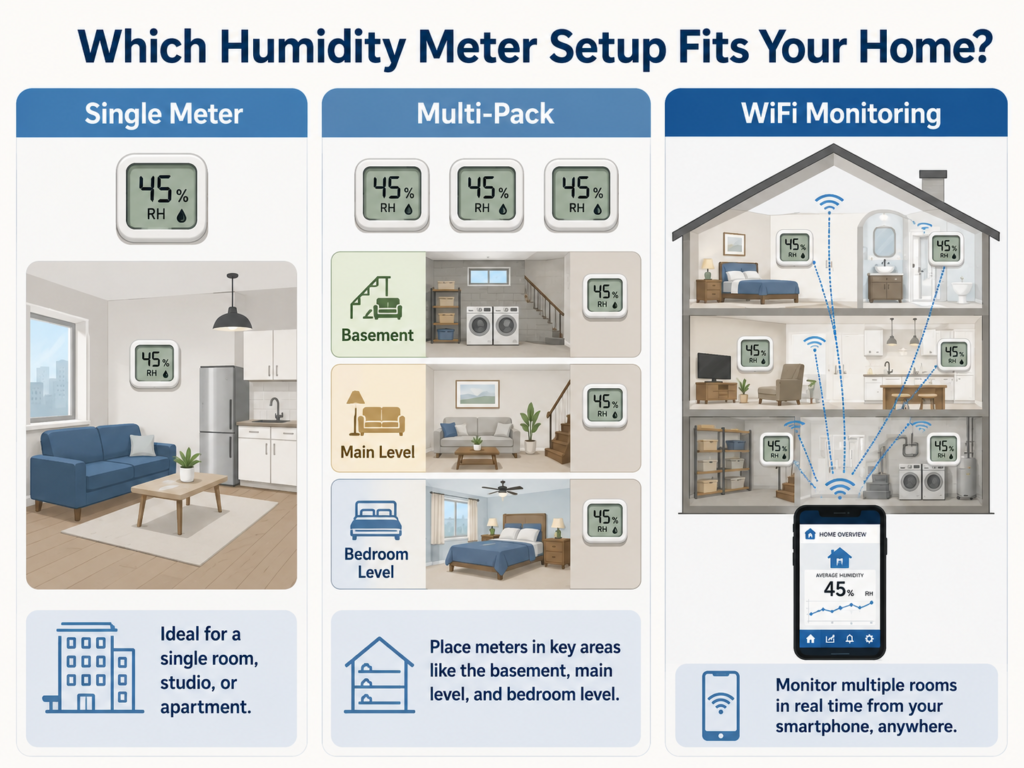
| Meter class | Best for | Main limitation |
|---|---|---|
| Basic single-room meter | Bedroom, office, apartment, nursery, or quick spot checks | Shows one location at a time |
| Multi-pack digital meters | Room-to-room and floor-to-floor comparison | Readings normally must be checked manually |
| WiFi or Bluetooth logger | History, alerts, remote monitoring, and unattended spaces | Higher cost and app/WiFi dependence |
| Broader IAQ monitor | Humidity plus other indoor-air measurements | Costs more and may add data unrelated to the humidity decision |
When a Broader Indoor-Air-Quality Monitor Makes Sense
Some devices combine temperature and humidity with particulate, carbon dioxide, volatile-compound, pressure, or other indoor-air readings.
These can be useful when humidity is only one part of a larger ventilation or indoor-air investigation. They are usually unnecessary when the only question is whether a basement, bedroom, or living area is too damp or too dry.
Additional sensors do not make the humidity reading automatically more accurate. Review each measurement capability separately rather than assuming a higher-priced multi-sensor device is better at everything.
Features That Actually Matter
The feature list can get ridiculous quickly. For measuring home humidity, most of the decision comes down to a short list.
| Feature | Why it matters | Priority |
|---|---|---|
| Relative humidity reading | The main number used for the humidity decision | Required |
| Temperature reading | Helps explain RH changes and comfort differences | Required |
| Readable display | Makes routine checks easier | Required for manual meters |
| Published accuracy tolerance | Provides a stated expectation for the sensor | Important |
| Min/max memory | Shows high and low readings between checks | Useful |
| Calibration or offset adjustment | Allows correction when a unit consistently reads high or low | Useful for long-term monitoring |
| History and export | Makes trends easier to review | Useful for diagnosis |
| Phone alerts | Warns when an unattended area crosses a threshold | Optional |
| Comfort icons | Provides a simplified dry, normal, or wet label | Low value |
Accuracy Tolerance
For ordinary home decisions, a manufacturer-stated tolerance around ±3% to ±5% RH is generally sufficient. The practical goal is to distinguish a clearly dry room, a middle-range room, and a persistently damp room.
That does not mean every unit will display exactly the same number. Consumer sensors can show small differences, especially after being moved or exposed to a temperature change.
Calibration and Side-by-Side Comparison
Some meters allow an RH offset or calibration adjustment. Even when they do not, a side-by-side comparison is useful. Place several meters together in one stable room and let them settle. A small spread is manageable. A unit that stays far above or below the group should not be the only basis for a buying decision.
Response and Stabilization Time
Response time describes how quickly the sensor reacts. Stabilization time is how long you should wait before treating the displayed number as representative of a new room.
After moving a portable meter, allow roughly 30 to 60 minutes before recording the result. Allow longer when the new room is much warmer or cooler than the previous location.
Min/Max Memory
Min/max memory is useful when the highest or lowest reading may happen overnight, during rain, while the HVAC is off, or while nobody is watching the display. It is not a full timeline, but it can reveal swings a current-reading-only meter would miss.
History, Alerts, and Exported Data
Connected meters can store charts, send threshold alerts, and export readings. These features are valuable when you are diagnosing a recurring condition or watching a remote property. They are unnecessary for a simple three-day room comparison.
Still Deciding?
One room: TempPro TP50 on Amazon
Several rooms: TempPro TP49 3-Pack on Amazon
Remote monitoring: Govee H5179 on Amazon
Humidity Meter Placement Affects the Reading
A good meter in a bad location can give you the wrong impression.
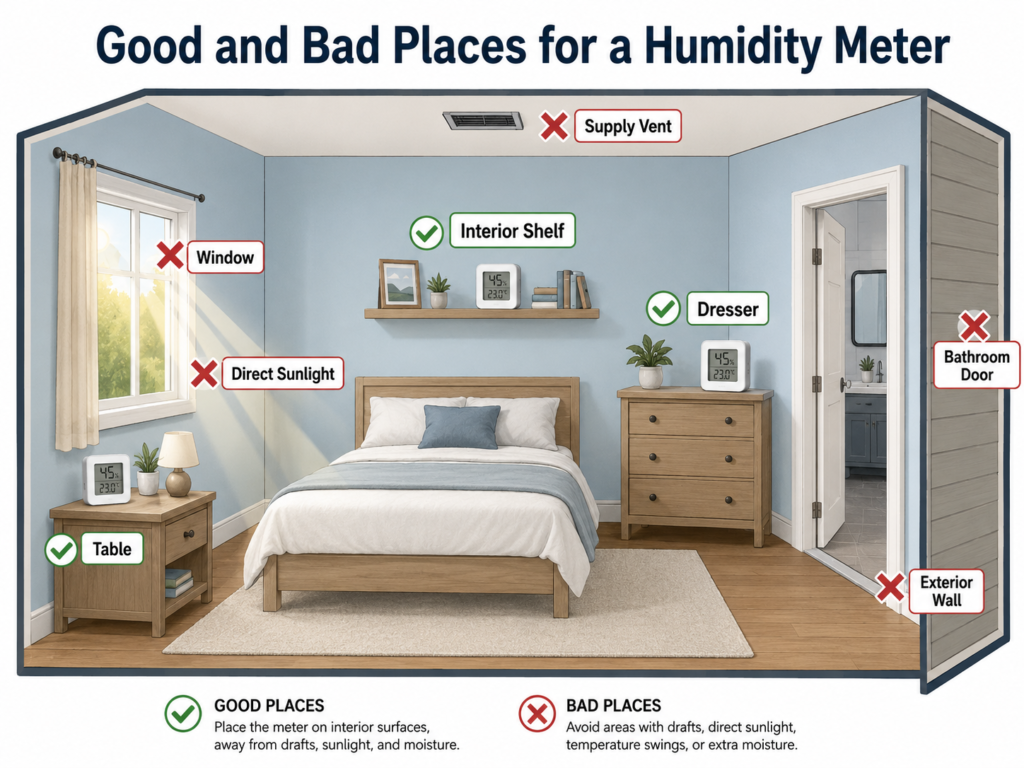
Good Placement
- About 4 to 5 feet above the floor
- On an interior shelf, dresser, or table
- In the occupied part of the room
- Away from direct sunlight
- Away from humidity-control equipment
Poor Placement
- Beside a supply vent or return grille
- Directly beside a window or exterior door
- Beside a shower, stove, sink, humidifier, or dehumidifier
- In direct sunlight
- Against a cold exterior wall
For detailed room-by-room positioning, use the Humidity Meter Placement Guide.
Why a Thermostat Reading Is Not Enough
A thermostat that displays RH measures one location. It may be installed in a hallway, near a return path, or far from the room where the problem is occurring.
That central reading may not represent a damp basement, dry bedroom, bathroom-adjacent hallway, garage, storage room, or closed room with weak airflow. Use the thermostat as one reference point and portable meters to find the differences.
How Long to Watch the Readings
Do not make a humidifier or dehumidifier decision from one quick reading.
For a basic check, record morning and evening readings for at least three days. Seven days is better when the readings are borderline, the weather is changing, or the problem comes and goes.
- Room or floor
- RH percentage
- Temperature
- Time of day
- Outdoor weather
- HVAC mode
- Showers, cooking, laundry, open windows, or other moisture events
Use How to Measure Humidity in Your Home for the complete tracking method.
What the Readings Tell You Next
| What your meters show | What it may mean | Where to go next |
|---|---|---|
| Most rooms are above 55% to 60% RH | The home may have a broader damp-air problem. | Too Much Moisture in Your Home |
| Only the basement is high | The condition may involve basement moisture, temperature, airflow, or sizing. | Basement Dehumidifier Size |
| Most rooms are below 30% RH | The home may be too dry during heating season. | Air That’s Too Dry at Home |
| One room feels damp but RH appears normal | Cool surfaces, still air, temperature differences, or sensor placement may be involved. | Why Your House Feels Damp Even at Normal Humidity |
| Readings jump after showers or cooking and then recover | The condition may be temporary moisture and ventilation. | How to Measure Humidity in Your Home |
Choose a Humidity Meter by Room Count and Monitoring Needs
If you need one simple meter, the TempPro TP50 is the cleanest choice. If you want to understand what several rooms are doing at the same time, the TempPro TP49 3-Pack is our default recommendation for most houses. If you need remote checks, history, and alerts, step up to the Govee H5179.
Whichever meter you use, placement and patience matter. Compare rooms, let the sensor stabilize, and watch the pattern for several days before buying equipment to add or remove moisture.